Boot from Windows 7 DVD. In the second screen, after choose your language, go to repair your computer.
go to command prompt and type the commands:
bootrec /fixmbr
bootrec /FixBoot
<Restart>
Showing posts with label Windows 7. Show all posts
Showing posts with label Windows 7. Show all posts
Monday, October 11, 2010
Tuesday, September 28, 2010
Set priority of application in Windows 7 using Task Manager
To start Windows 7 Task Manager, Right Click the TaskBar and Start Task Manager.

In the Applications tab, right-click the application you want to change the priority.
Select Go To Process.
Right-Click the process and choose the option from the Set Priority.

In the Applications tab, right-click the application you want to change the priority.
Select Go To Process.
Right-Click the process and choose the option from the Set Priority.

Windows Resource Monitor of Windows 7
Windows Resource Monitor is a system tool of Windows 7 that allows you to view information about the use of hardware (CPU, memory, disk, and network) and software (file handles and modules) resources in real time. You can filter the results according to specific processes or services that you want to monitor. In addition, you can use Resource Monitor to start, stop, suspend, and resume processes and services, and to troubleshoot when an application does not respond as expected.
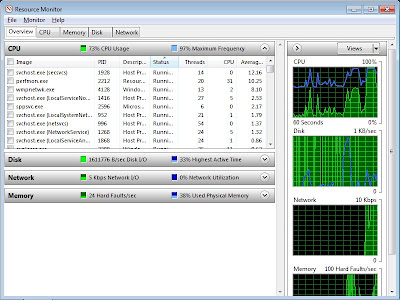
To start Windows Resource Monitor, click Start and type "resmon" into the search box.

To start Windows Resource Monitor, click Start and type "resmon" into the search box.
Subscribe to:
Posts (Atom)


